mapRenderer.ts
MapLibre globe projection. Owns navigation, markers, labels, country borders, terrain (3D elevation tiles), and region highlighting. Loads Blue Marble (day) and Black Marble (night-lights) GIBS tile sources on startup.

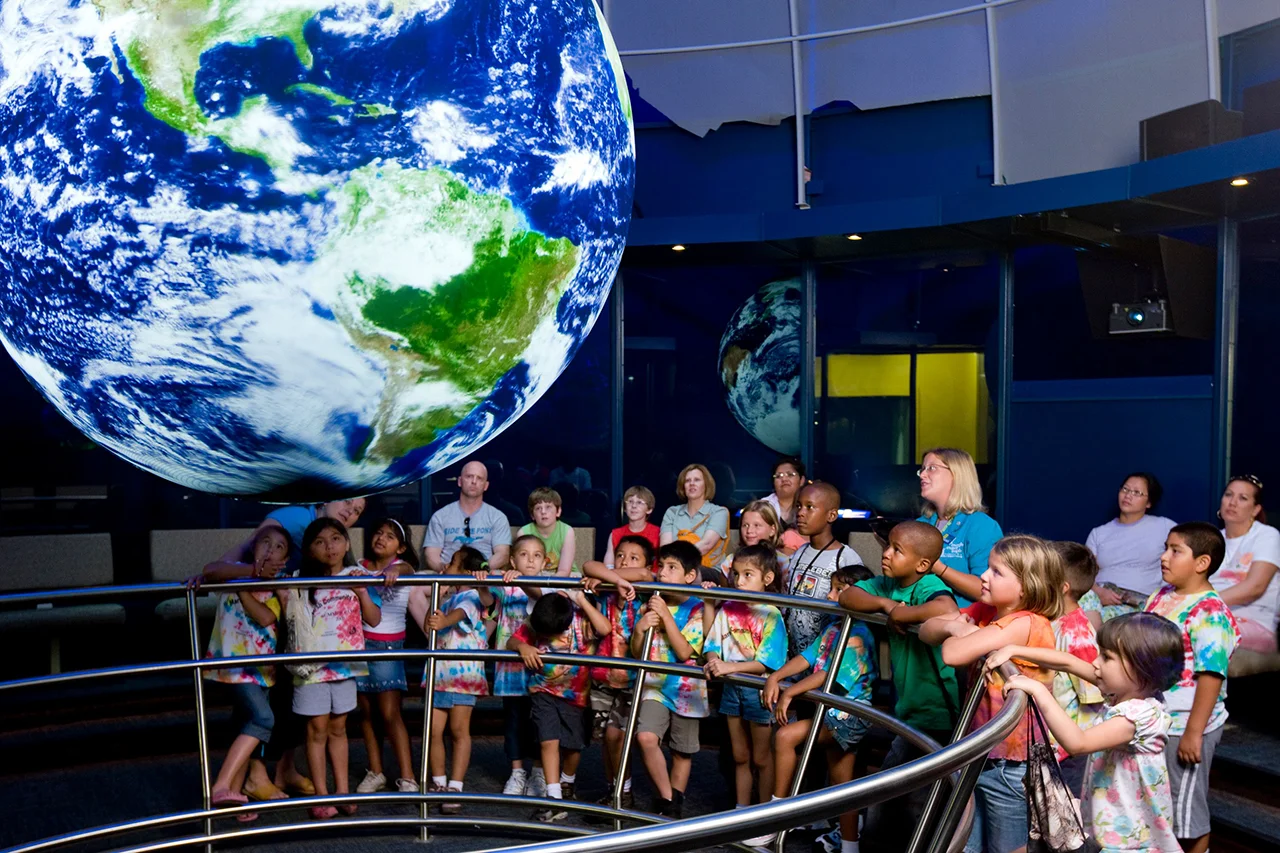
Science On a Sphere lives in museums. TerraViz puts it on every screen — and lets anyone publish to every screen.


The mission
Environmental literacy is a prerequisite for an informed society — and most people never see the planetary data NOAA collects on their behalf. Geography, mobility, access, and cost create a gap between the data and the public it was collected to serve.
That gap has a second edge. The universities, research groups, planetariums, science museums, and visitor centers with visualizations of their own to share face the same problem in reverse — the path to public reach historically runs through a museum partnership that may never come, or a platform handoff that surrenders control of the data along the way.
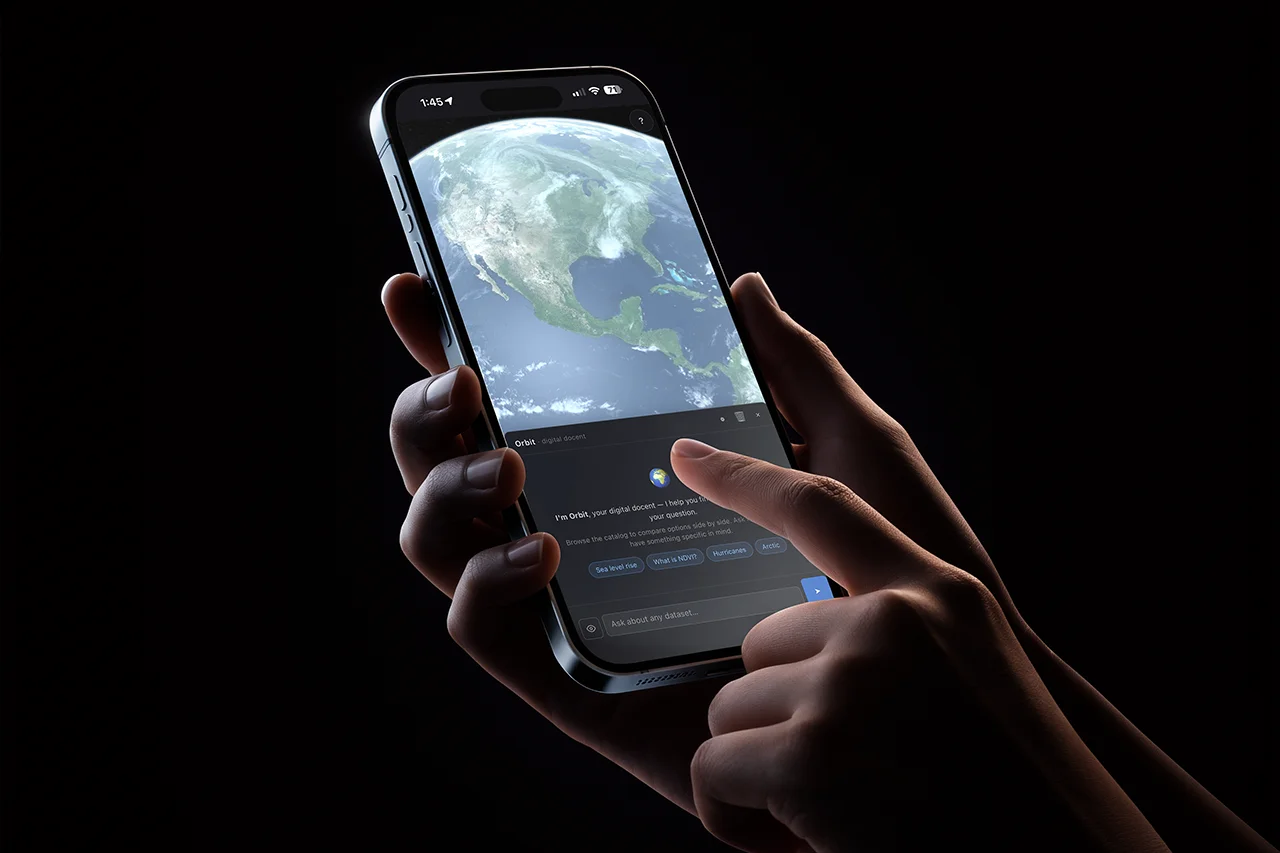
TerraViz closes both with one project. A web-based 3D globe, streamable to any phone or laptop and immersive on AR/VR headsets. A federated catalog backend lets anyone self-host a node, publish their own datasets, and have those rows surface across every peer in the network. The path in has a four-tier on-ramp: publish to the live catalog in minutes, mirror it locally in hours, host a full peer in days, or implement a node from scratch against the published spec in weeks.
The inspiration is NOAA's Science On a Sphere — the room-sized suspended-globe installation projecting planetary data across its surface in museums since 2000. One of the most powerful tools ever built for communicating environmental science; the constraint has always been that you have to be in the room. TerraViz brings a similar view to every device, SOS-format tours import unchanged, and the catalog seeds from the SOS dataset library — but the federation layer is what extends the reach. NOAA's data is the seed, not the ceiling.
Same data, no museum required. Same publishers, no platform required.
What you can do
There is plenty of ground to cover, and you don't have to read it in order. Each card jumps straight to the section that takes that topic apart. Sections stand on their own, so start wherever catches your eye, and double back if a cross-reference points somewhere new.
§1
MapLibre globe + NASA GIBS tiles. Day/night blend, city lights, clouds, specular sun glint, and atmosphere — composited in WebGL2 over a custom multi-pass layer.
See how it works§2
One, two, or four globes side-by-side. Camera lockstep across panels; time-series animations sync by real-world date.
Compare scenarios§3
Curated walkthroughs that fly the camera, swap layouts, and load datasets by narrative. Today AI-authored, human-reviewed. Soon: Orbit-authored on demand.
Read the tour story§4
A hybrid local + LLM chat surface that explains datasets, recommends tours, and loads them onto the globe by conversation. Provider-agnostic.
Meet Orbit§5
WebXR on Quest. AR places the Earth on your real desk; VR drops you in front of a room-scale globe. Three.js lazy-loaded — non-XR browsers never pay the cost.
Step inside§6
One TypeScript codebase. Ships as a web app, Windows / macOS / Linux desktop (Tauri v2), and iOS / Android (Tauri mobile, in flight).
See the platforms§7
English source, Spanish complete, Arabic layout wired. Runtime t() + plurals + interpolation; <html dir> auto-flips; logical CSS throughout. Weblate as the canonical translator UI.
§8
Self-host your own catalog. SQL DB, object storage, edge cache, and SSO behind a versioned API — Cloudflare today (D1, R2, KV, Access), portable by design. Federation across peer nodes is drafted, with live cross-node operation coming next.
Run your own§9
Publisher portal, tour creator, asset pipeline (R2 + GitHub Actions transcode), authoring CLI, and the Vectorize-backed semantic search index. How content gets into a node, before it ever federates.
Add your data§10
Two-tier consent — Essential events on by default for usage shape; Research events opt-in for deeper signals. No IP storage, no User-Agent, search queries hashed before they leave the device.
How we measure§11
Vanilla TypeScript. MapLibre + Three.js (lazy) for the globe. Tauri v2 for desktop. Cloudflare Pages, D1, R2, Workers AI for the backend (today's stack — portable by design). Boring picks where they buy reliability.
See the choices§1 · The globe under the hood
There are two common ways to build a 3D Earth on the web. A scene-graph engine like Cesium gives you a full globe runtime; a map engine like MapLibre gives you tile streaming, vector borders, and navigation but no photoreal Earth. TerraViz picked the map-engine side — NASA's GIBS Earth-imagery service speaks WMTS, which MapLibre reads natively; country borders, labels, and 3D terrain are commodity vector and raster-DEM tiles you compose as style layers; and the runtime is ~200 KB gzipped, light enough for a phone. The photoreal half is hand-built: a WebGL2 layer hooked into MapLibre's CustomLayerInterface extension point composites a day-night terminator, real-time clouds, specular sun glint, and a starfield every frame, on the same canvas as the tiles. No external globe library, no framework runtime.
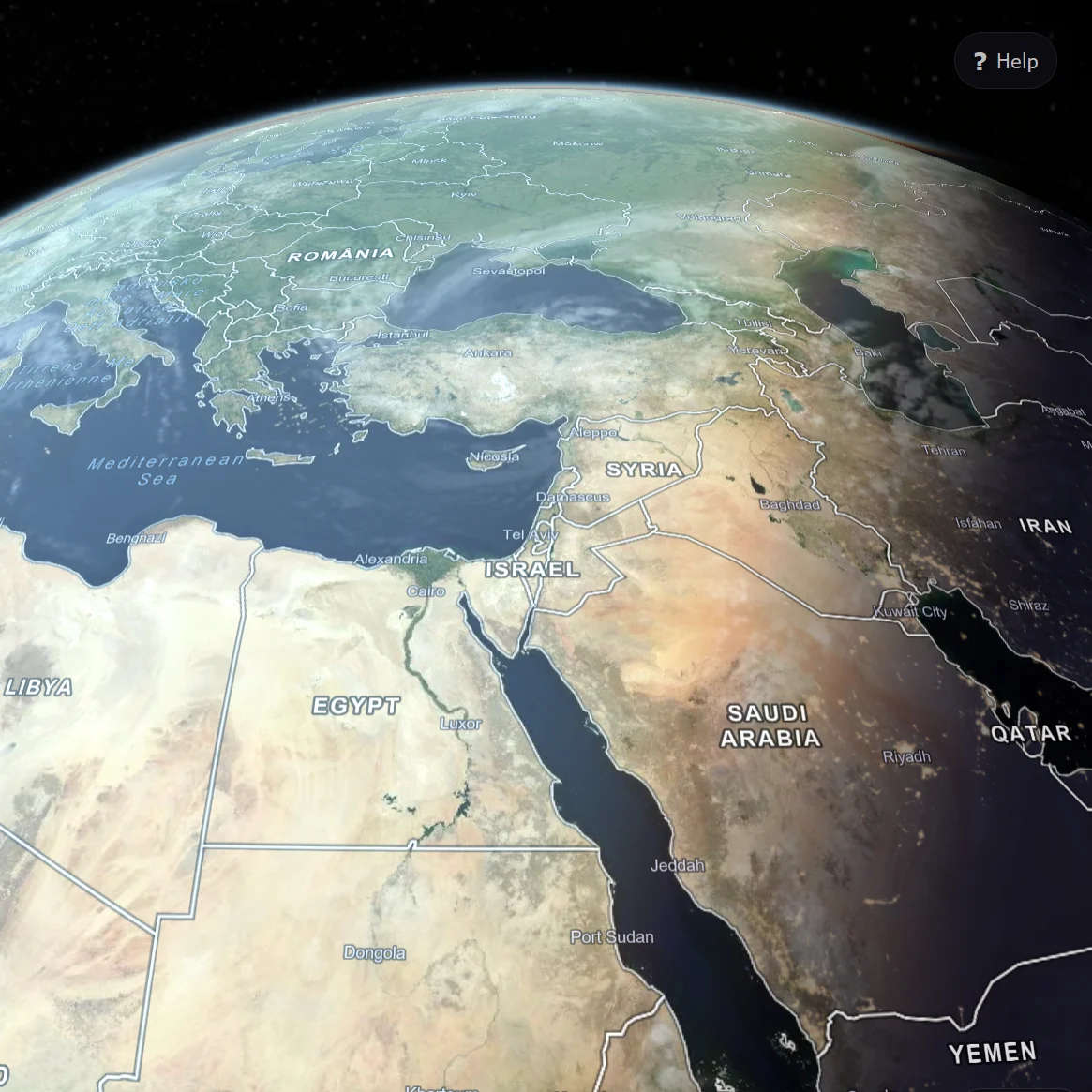
MapLibre globe projection. Owns navigation, markers, labels, country borders, terrain (3D elevation tiles), and region highlighting. Loads Blue Marble (day) and Black Marble (night-lights) GIBS tile sources on startup.
A MapLibre CustomLayerInterface running multi-pass WebGL2: day/night blend gated on real UTC sun position, framebuffer-captured city lights, specular sun glint, real-time clouds, starfield skybox.
Eagerly fetches low-zoom GIBS tiles into the browser cache on startup, so the first interaction lands on a fully-painted globe rather than a checkerboard of pending tile requests.
Hands a dataset to the globe: progressive image fallback (4096 → 2048 → 1024) for stills, HLS streaming with adaptive bitrate for video, attached as a live texture either way — same display path.
DATA SOURCES → CustomLayerInterface (multi-pass WebGL2) → COMPOSITED FRAME
Most of TerraViz's serving lives on Cloudflare today — the catalog database, the asset store (now including the HLS video ladder), the docent's LLM, the semantic-search index, telemetry, auth, and the CDN edge cache that sits in front of all of it. Video is transcoded out-of-band rather than by a managed service: a publisher upload lands in R2, a GitHub Actions runner re-encodes it to a multi-rendition HLS ladder with ffmpeg, and writes the segments back to R2. There is no Cloudflare Stream in the path — it was evaluated and dropped once its standard-plan 1080p rendition ceiling proved too low for the 4K spherical content the globe renders. A small set of endpoints live elsewhere by design: NASA GIBS for tile-cache locality, the legacy Vimeo proxy still serving the video rows not yet migrated to R2, and a configurable bring-your-own-LLM path for visitors who prefer their own provider over Workers AI. Solid boxes are live in production today; PLANNED dashed boxes are drafted in the catalog backend docs but not yet bound.
CLIENT → CLOUDFLARE EDGE → DIRECT-FETCH ENDPOINTS
Native desktop and mobile (Tauri) builds also reach Cloudflare Pages for the auto-update channel — latest.json and signed installer URLs served from the same Pages project as the web app.
The full TerraViz application, embedded. The buttons under the frame deep-link the iframe to specific globe states. Tap fullscreen for a presenter-ready view; press Esc to exit.
Loading the live demo…
If the embed doesn't load within a few seconds, the network may be blocking framed content. Open terraviz.zyra-project.org directly in a new tab.
Each button reloads the embedded app with the matching query parameter; the app reads it on boot and applies the toggle. Default resets to the unmodified globe view.
§2 · Multi-globe comparison
Comparing climate scenarios, hurricane seasons, or sea-ice extents across years is the kind of question a single globe can't answer. viewportManager.ts orchestrates one, two, or four MapRenderer instances inside a CSS grid, mirrors camera state across panels in lockstep, and keeps each panel's dataset clock aligned to a shared real-world calendar. Drag panel 1 — panels 2, 3, and 4 follow.
Creates and destroys MapRenderer instances to match a target layout (1, 2h, 2v, or 4). Tracks a "primary" panel that drives playback, screenshots, and the info panel. Promotion buttons in each non-primary panel's top-left corner let visitors swap which one leads.
Every renderer's move event mirrors lat / lng / zoom / bearing / pitch to its siblings via jumpTo — instantaneous, no easing, no drift compounding. A syncLock flag breaks the otherwise-infinite recursion that "every sibling fires its own move" would create.
Time-series datasets sync by real-world date, not playback offset. A hurricane in September 2024 on panel 1 lines up with the same week of sea-surface temperature on panel 2 — even when the two animations have different total lengths or framerates. Each panel runs its own clock against a shared calendar.
The buttons below deep-link this section's demo iframe to a specific panel layout. Tour authors use the same switch via the setEnvView task (see §3).
Loading the live demo…
If the embed doesn't load within a few seconds, the network may be blocking framed content. Open terraviz.zyra-project.org directly in a new tab.
Each button reloads the embedded app with ?layout= set; the app reads the parameter on boot and creates the matching grid before any dataset loads. Drag any panel afterwards — the others follow in lockstep.
§3 · Tours — data-driven storytelling
A tour leads a visitor through a story — flying the camera to the Great Barrier Reef, swapping in the SSP5 sea-surface-temperature animation, opening a 4-globe layout to compare scenarios, pausing for them to look. It's the same kind of guided arc a Science On a Sphere docent walks a museum audience through, played back the same way on every device, replayable on demand. Behind it is just a small JSON document — flyTo, loadDataset, setEnvView, showRect, pauseForInput — that the engine executes one task at a time, awaiting each promise before stepping to the next.
The Climate Futures tour compares SSP1, SSP2, and SSP5 climate scenarios across air temperature, precipitation, sea-surface temperature, and sea-ice concentration. The script is data; the app is the player.
pauseForInput, pauseSeconds, and the showRect / hideRect overlay tasks build pacing into a tour the way a lesson plan paces a class. Captions support <color=…> and <i> markup; the SOS tour-builder ecosystem already produces this format.
The tour engine is the bridge that turns Orbit from a chat surface into an agent. Tours load through the same <<LOAD:TOUR_ID>> markers used for datasets, and the docent is already prompted to recommend tours when a visitor "seems new, asks for an overview, or wants to learn about a broad topic." Saying "show me how the climate is going to change by 2100" can fly the camera, swap to a 4-globe layout, load four datasets across the panels, and start the narration — all from chat.
A representative subset of what tourEngine.ts already supports today.
| Task | Effect |
|---|---|
flyTo |
Camera to lat/lon at altitude (resolves on moveend) |
loadDataset |
Loads a dataset; worldIndex routes it to a specific panel |
unloadDataset / unloadAllDatasets |
Clears the globe (or a specific panel by tour handle) |
setEnvView |
Switches 1g / 2g / 4g layout |
datasetAnimation |
Toggles play / pause on the current video |
showRect / hideRect |
Glass-styled DOM text overlays with <color> and <i> markup |
pauseForInput |
Wait for the user to tap play (or press space) |
pauseSeconds |
Timed pause |
setGlobeRotationRate |
Auto-rotate speed in degrees per second |
envShowDayNightLighting / envShowClouds |
Earth-stack toggles |
AI is already in the tour-authoring loop today. Closing it is the next deliverable, not a research project.
Today
Climate Futures and the other samples under public/assets/*-tour.json were drafted by an LLM from prompts that named the datasets and the story to tell, then human-reviewed and adjusted. The JSON format is small, declarative, and the task surface is documented — which makes it a plausible target for LLM authoring even with today's models.
Forward
Orbit currently recommends tours from the catalog and loads them. Closing the loop — having Orbit generate a tour from a question like "walk me through how Atlantic hurricane seasons have changed since 2000" — turns the docent from a chat surface that knows the catalog into an educational-scaffolding generator. A <<TOUR:…>> marker carrying inline JSON, or a function-calling tool that returns a tour document, is a credible next deliverable.
Forward direction. Not shipped — yet.
Loading the live demo…
If the embed doesn't load within a few seconds, the network may be blocking framed content. Open terraviz.zyra-project.org directly in a new tab.
Climate Futures · 2100 reloads the embedded app with ?tour=climate-futures; the tour engine takes over from the welcome rect. Ask Orbit to pick one → reloads with ?orbit=open&prompt=tour, which opens the chat panel pre-filled with "I'm new here. What tour should I start with?" — press ↵ to send.
Want to author your own? See docs/TOURS_IMPLEMENTATION_PLAN.md for the engine internals, the full task list, and the callback contract.
§4 · Orbit — the digital docent
Orbit is hybrid. A local keyword engine runs concurrently with an LLM stream over any OpenAI-compatible endpoint — instant + offline on one side, depth and provider-of-your-choice on the other. If the LLM errors or is disabled, the local engine's response transparently takes over. When the LLM succeeds, it can drop datasets and tours straight onto the globe via the same <<LOAD:ID>> marker pattern. Orbit can also listen and talk back — optional speech-to-text input and spoken replies, on-device in the browser by default, with an opt-in Cloudflare-edge voice path (Whisper transcription + edge TTS).
Orchestrator. processMessage() races the local docentEngine match (instant, offline) against the LLM stream. If the LLM fails, the local result is used. If the LLM succeeds, its stream is the sole source of dataset and tour recommendations.
System-prompt builder. Turn-aware — full catalog (ID, title, categories) on turn 0; compact catalog (ID, title) thereafter. Last 3 exchanges sent verbatim; older history summarised. Keeps per-turn cost bounded as a chat grows.
Provider-agnostic OpenAI-compatible SSE client. Works against OpenAI, Ollama, LM Studio, Cloudflare AI Gateway, llama.cpp, vLLM. On desktop the API key lives in the OS keychain (Windows Credential Manager / macOS Keychain) instead of localStorage.
processMessage() kicks off the local engine and the LLM stream concurrently. Stream chunks reach chatUI as they arrive; the LLM's <<LOAD:ID>> markers are parsed into action chunks that render as inline load buttons.
The four chunk shapes chatUI consumes from processMessage():
delta — text fragment to append to the current bubbleaction — <<LOAD:ID>> resolved into a clickable load buttonauto-load — dataset loaded immediately, no click requireddone — stream complete; fallback: true flag if local engine took over
Anthropomorphic interfaces have a long history in education and tutoring software, but the literature is split — sometimes the avatar lifts engagement, sometimes it pulls attention away from the content. We don't yet know which way it falls for environmental data on a globe. The procedural Orbit character — today reachable at /orbit as a standalone test bench — is the artifact for finding out: a six-state behavior machine (idle, listening, thinking, talking, chatting, confused), Bézier flight presets, four palettes, a postMessage bridge, full prefers-reduced-motion handling. Embedding the character inside the chat panel itself is the planned next experiment: A/B-able, instrumented through the Tier-A analytics pipeline (see §10).
The chat surface is the LLM-driven docent embedded in the live app — the Orbit you actually talk to. The character surface is the standalone /orbit page, today a character study: the procedural avatar's animation states, palettes, and flight presets running in isolation, not yet wired to the LLM. Toggle between them in the iframe below.
Loading the live demo…
If the embed doesn't load within a few seconds, the network may be blocking framed content. Open terraviz.zyra-project.org directly in a new tab.
The chat surface reloads the embedded app with ?orbit=open so the chat panel is already open when the page paints. The character surface swaps the iframe to the standalone /orbit character study — animation states, palettes, and flight presets running on their own, with no LLM connection yet. Wiring the avatar to the chat is the next experiment.
§5 · Immersive — AR & VR via WebXR
Tap Enter AR on a Quest 3 and the photoreal Earth lands on your desk — anchored to a real surface, walkable around, persistent across sessions thanks to Meta Anchors. Tap Enter VR on PCVR and the same planet drops in front of you at room scale. Both modes share the same dataset textures the 2D app already loaded, so switching in costs you nothing extra.
Try it
WebXR sessions can't reliably launch from inside an embedded iframe — the browser needs the page to be the top-level document. Open the live app on a Quest 2 / 3 / Pro browser (or any WebXR-capable PCVR rig) and the Enter AR / Enter VR button appears in the top-right.
Open terraviz.zyra-project.org →Real captures from a Quest 3 are the visual centrepiece — anchored globes on real desks, room-scale photoreal Earth, the in-VR HUD. They drop in alongside the rest of the asset follow-up.
Place the planet on the table next to you. Walk around it.
Persistent anchors keep the globe in the same spot the next time you open the app.
PCVR fallback when AR isn't supported. Same Earth stack.
CanvasTexture-backed floating UI. Title, play/pause, exit-VR.
Placeholders. Real captures swap in via a follow-up commit when they're ready.
With no dataset loaded, the photoreal Earth stack runs in full. With a dataset, every Earth-specific decoration (atmosphere, clouds, night lights, specular) is hidden so the data reads uniformly across the sphere. Same camera, same controller, two visual modes.
No dataset · photoreal stack runs in full
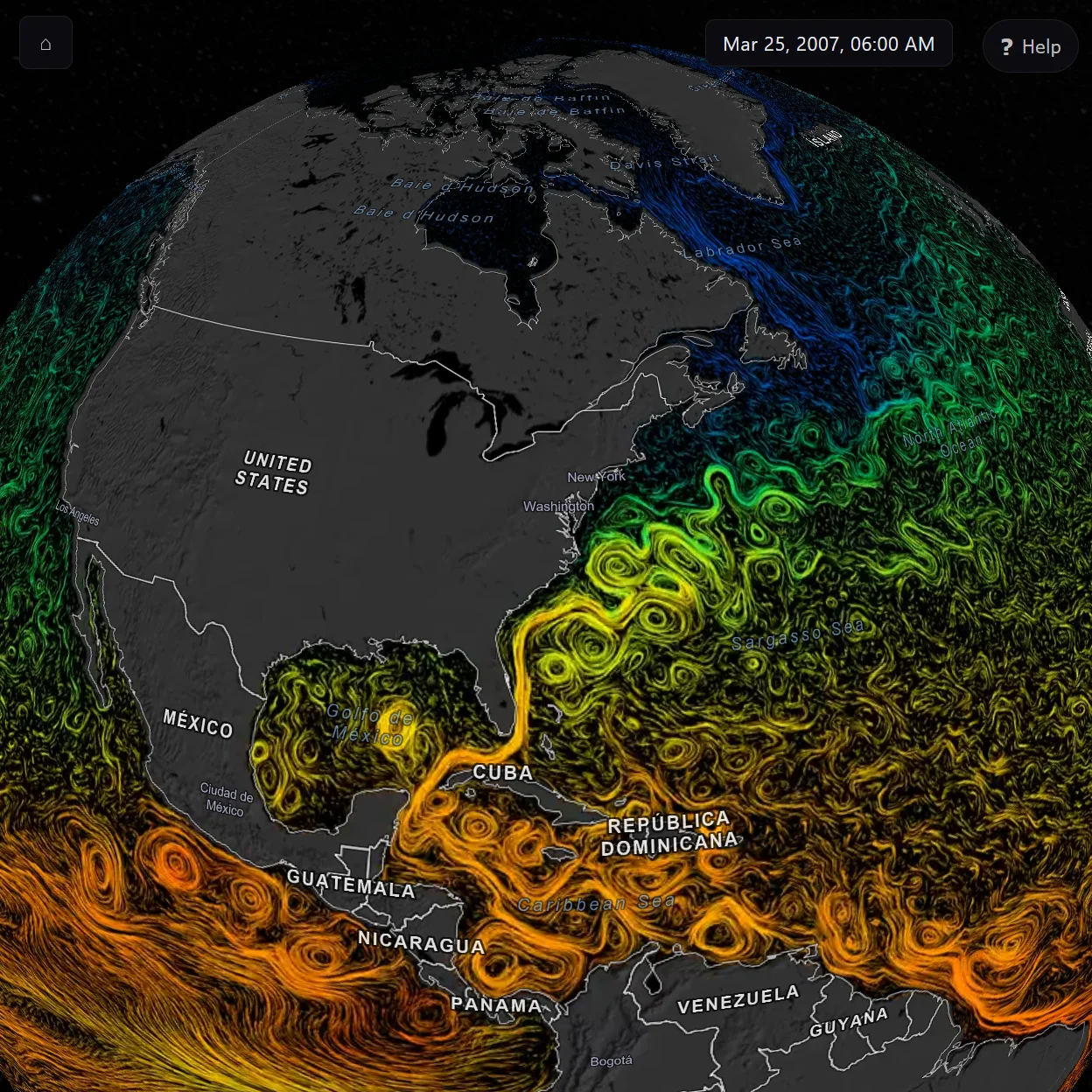
Dataset loaded · decoration hidden so the data reads uniformly
MapLibre's WebGL canvas can't be reused inside an XR session — its render loop, projection matrices, and viewport are owned. So immersive mode is a parallel Three.js renderer, attached to its own canvas, lazy-loaded only on the first Enter AR / Enter VR tap. renderer.xr.setSession() takes over; on session-end the 2D canvas resumes. Browsers without navigator.xr never load the Three.js chunk and see no UI change.
Session lifecycle. enterImmersive('ar' | 'vr') requests the session, builds a Three.js renderer + camera, calls renderer.xr.setSession(), drives a separate XR render loop via XRSession.requestAnimationFrame, and yields back to MapLibre on session-end.
The Earth stack — diffuse, night lights, specular, atmosphere, clouds, sun, ground shadow — with day/night shading gated on the real UTC sun position. Same factory used on /orbit; here it provides the empty-state planet when no dataset is loaded.
Controller input. Surface-pinned drag, two-hand pinch + rotate, thumbstick zoom, flick-to-spin inertia. Raycast hit routing for the floating HUD's UV regions and the AR Place button.
AR-only. WebXR hit-test + reticle + Place button. Anchors the globe to a real surface; persistent-handle UUIDs in localStorage keep it in the same physical spot across sessions on Quest (Meta Anchors extension).
The XR render loop runs in this order every frame. Steps marked AR only are skipped in VR sessions. Order matters — anchor-pose sync (step 2) must run before scene update (step 6) so the atmosphere and sun track the placed globe.
Each frame the headset re-checks where real-world surfaces are, so the targeting reticle stays accurate as the user moves.
Query the WebXR hit-test source for surface intersections. Drives the placement reticle.
Once the user has placed the globe on a desk, snap it back to that exact spot every frame so it stays glued there as they walk around.
If the globe is anchored, read the anchor's current pose and write it into globe.position.
If the user picked a new dataset, wrap the globe in it — reusing the video or image already loaded by the 2D app, so nothing re-downloads.
Idempotent no-op in steady state; updates if the dataset changed since the last frame. Reuses the existing <video> via THREE.VideoTexture or the decoded HTMLImageElement — zero re-fetch.
Refresh the floating control panel only when something has actually changed, instead of redrawing the same pixels 90 times a second.
Debounced. Updates the in-VR floating panel's title, play/pause label, and exit-VR icon as the underlying state changes.
Turn the user's hand and thumbstick movements into globe motion — grab to spin, pinch to twist and zoom, flick to send it rotating.
Controller input — rotation, zoom, inertia. Surface-pinned drag, two-hand pinch + rotate, thumbstick zoom, flick-to-spin.
Move the atmosphere, ground shadow, and sunlight to follow the globe's new position. The day/night line is computed from the real current time.
Earth-stack tracking — shadow, atmosphere, sun positions follow globe.position. Day/night shader updated against real UTC.
Slide the control panel and Place button along with the globe so the controls never drift away from the planet.
Floating UI follows the globe so the HUD never drifts away from the data the user is looking at.
While a dataset is still loading, keep the spinning rings and progress bar moving; fade them out the moment the data is ready.
Orbiting rings + progress bar + status text on the 3D loading scene. Fades out when the dataset is ready.
renderer.render(scene, camera)
Hand the finished frame to the GPU. It's drawn twice — once per eye, slightly offset — which is what produces stereo depth.
Submit the frame. WebGL2 + the XR session's compositor handle the per-eye projection.
WebXR support is a moving target. Apple has not shipped a WebXR implementation on iOS Safari, so iPhones can't enter the immersive globe via the same code path that Quest does. The model-viewer fallback below closes that gap (without porting the full app).
| Platform | immersive-ar |
immersive-vr |
Notes |
|---|---|---|---|
| Meta Quest 2 / 3 / Pro | ✓ | ✓ | The primary target. AR-first button. |
| Android Chrome (Pixel + recent Samsung) | ✓ | — | ARCore-backed. Phone AR, not headset. |
| PCVR (SteamVR, Index, etc.) | — | ✓ | Falls back to immersive-vr when immersive-ar is unsupported. |
| iOS Safari (any iPhone) | ✗ | ✗ | Apple has not shipped WebXR. navigator.xr is undefined. |
| Other desktop browsers | — | — | The XR button hides cleanly. The 2D experience is unchanged. |
§6 · One codebase, every platform
The same source tree ships as a web app on Cloudflare Pages, a desktop app on Windows / macOS / Linux, and an iOS / Android mobile app. Tauri v2 wraps the app in a native shell and exposes platform-specific capabilities (offline tile cache, OS keychain, local-LLM HTTP allowlist) behind a single runtime gate — window.__TAURI__ — so web builds tree-shake every native code path away. Mobile is additive on top of the existing desktop tree; src-tauri/gen/apple/ and src-tauri/gen/android/ are the generated host projects.
The app decides at runtime whether it's running in a browser, a desktop window, or a phone app — and lazy-loads the right capability shim. Web builds don't even download the Tauri-only modules.
A row per target. Native capability call-outs flag what each Tauri build adds on top of the shared app.
terraviz.zyra-project.org. Zero install, every device. Shared TypeScript with the desktop and mobile builds — the rest of the matrix is what gets added on top.
tile_cache.rs, SHA-256 flat-file), an OS keychain for LLM API keys, an HTTP allowlist that lets the webview reach local LLM endpoints (Ollama / LM Studio / llama.cpp / vLLM), and a Tauri-updater channel. Distributed via signed GitHub Releases — .msi, .dmg, .AppImage.
src-tauri/gen/apple/. Mobile-only capability set restricts to HTTPS (no localhost-LLM allowlist on a phone). Release pipeline signs the IPA and uploads to TestFlight via App Store Connect.
src-tauri/gen/android/. Same Tauri-mobile path as iOS. Release pipeline signs the AAB and uploads to the Play Console Internal Testing track via a service account.
§7 · Localization
NOAA collects planetary data for everyone, but a curious 12-year-old in Mexico City or a Kabyle-speaking student in Algeria shouldn't need English to explore it. TerraViz separates the UI strings from the source, wires every screen to a language picker, and routes translator effort through the same tools translators already know.
Foundation work for any locale a community decides to contribute. A language appears in the in-app picker once it reaches ≥80% key coverage; below that, reachable via ?lang=<code> for testing.
locales/en.json
?lang=ar
The runtime is a thin layer — t(), plural(), and interpolate() over flat key→value JSON. The codegen builds a TypeScript MessageKey union from en.json, so any unresolved key fails type-check before it ships. <html dir> auto-flips for right-to-left locales; every stylesheet uses logical CSS properties (padding-inline-start, inset-inline-end, text-align: start) so the layout mirrors correctly without per-locale overrides. Orbit — the digital docent — inherits the active locale via a single LLM-prompt anchor, so chat answers arrive in the user's language without a per-locale prompt fork to maintain.
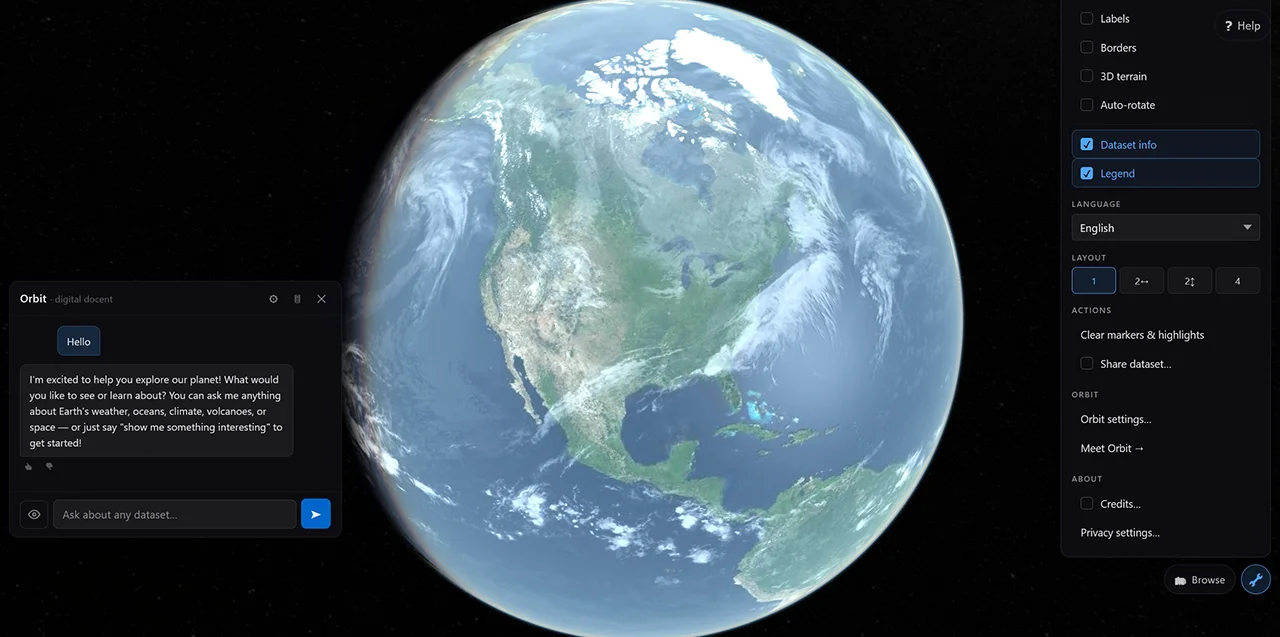
en · 100%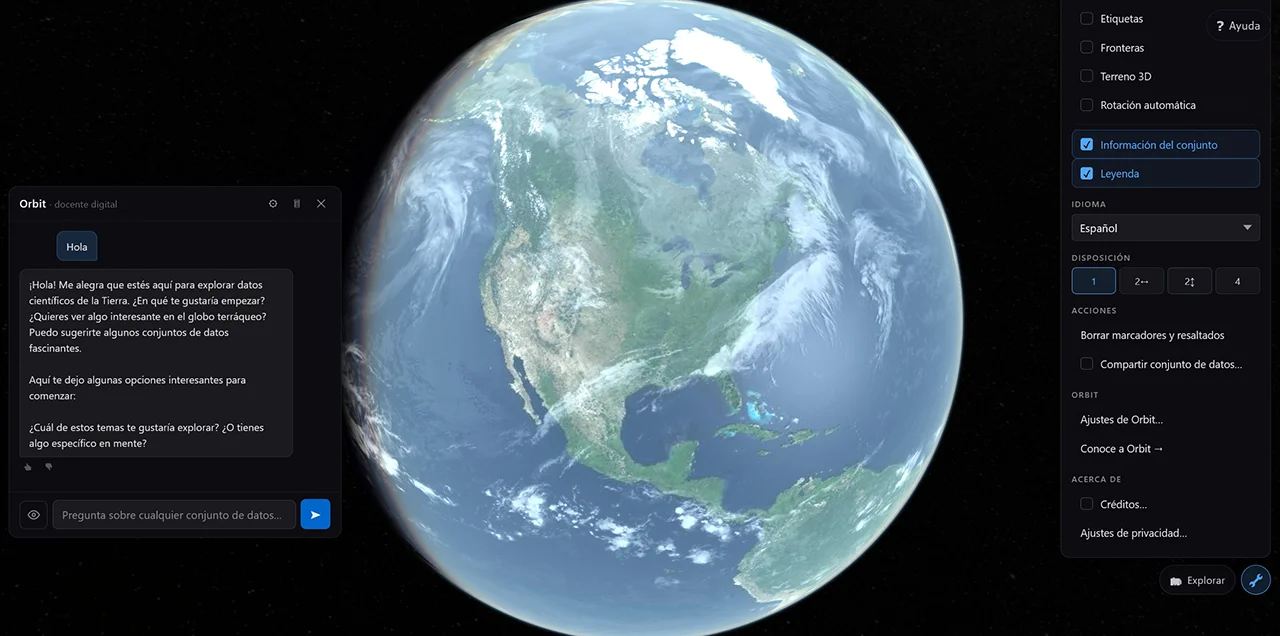
es · 100%
Translators don't need git. Weblate is a web editor with translation memory, glossaries, suggestion voting, and per-string developer notes — the same tooling Mozilla, KDE, and the Tor Project use. A GitHub Actions workflow round-trips translator changes back into main as DCO-signed pull requests; the codegen acts as the canonical formatter so re-sync never produces whitespace-only churn.
main.
locales/_explanations.json carries per-string developer notes for the ~30 strings where the key alone leaves a translator guessing (preserve {placeholders}, <<LOAD:DATASET_ID>> markers, ARIA descriptions). A GitHub Actions workflow auto-syncs those into Weblate's per-string Explanation field on every change.
L1 (UI chrome) and L1.5 (RTL) ship now. L2 is unblocked — the publishing backend it depends on has shipped — and is the next wave to build; L3 and L4 still wait on cross-node federation.
/api/v1/locale/<lang> overlay endpoint, plus a publisher-portal locale-override editor. Lets a partner relabel their deployment without forking the source.
dataset_translations sidecar table, CLI --lang sidecar files, and federation propagation of signed translation rows so a translation made at one peer surfaces across the network.
The split is deliberate: shipping the UI in your language is something a single community translator can accomplish in a week on Weblate. Translating the catalog requires schema, signing, and federation — work that lands when the publishing backbone itself does.
Full plan, phase table, and runtime API live in docs/I18N_PLAN.md; the translator workflow, glossary conventions, and DCO setup are documented in CONTRIBUTING-TRANSLATIONS.md.
§8 · Federated catalog & custom backend
TerraViz reads its catalog from a self-hosted node-backend by default. The backend is Pages Functions in front of D1 (catalog database), R2 (assets), Workers Analytics Engine (telemetry), KV (caches), and Cloudflare Access (auth) — all on the same platform as the app's deploy. Each node has a signed identity, advertises a federation manifest at /.well-known/terraviz.json, and exposes a versioned API at /api/v1/*. Subscribe to other nodes; their catalog merges into yours; their data stays on their hardware.
The legacy NOAA Science On a Sphere (SOS) S3 catalog is the system the cutover replaces — kept behind the VITE_CATALOG_SOURCE=legacy env-var as a rollback hatch during the stabilisation window, scheduled for removal once node-backed deployments have run cleanly in production for a release cycle.
The HTTP surface — catalog, search, featured, publish, federation pull. Same Cloudflare account as the app, same deploy mechanism, same edge.
SQLite at the edge. Datasets, tours, categories, federation peers, signed identities. Migrations live in migrations/; npm run db:reset seeds ~20 SOS rows for local dev.
Object storage for thumbnails, legends, captions, supporting media. Replaces the legacy SOS S3 dependency. Per-instance — your data, your bucket.
Telemetry sink (Tier-A and Tier-B events), short-lived caches, and auth for the publisher portal. Cloudflare Access handles staff sign-in; community publisher onboarding is a phased follow-up.
The canonical node above is one shape. Joining the network has four shapes — minutes to publish a row against the canonical catalog, hours to mirror that catalog locally, days to host a full bidirectional peer, weeks to implement a node from scratch in any language. Partners pick their burden; Zyra ships the spec and one canonical implementation, not a portfolio of stacks.
| Tier | What the partner does | Burden |
|---|---|---|
| 0 · Publisher | terraviz publish dataset.yaml on a schedule against the canonical node. No node hosted; data appears in the canonical catalog and propagates to every subscribing peer. |
Minutes — same shape as a CI deploy step |
| 1 · Read-only peer | Subscribe to a canonical node's feed; mirror catalog metadata; serve locally. No publishing, no asset hosting. The lightweight peer appliance is the reference implementation. | Hours — single config file plus container or fork |
| 2 · Full peer | Publish own data, host assets, federate bidirectionally. Subscribers see your rows alongside the canonical catalog; you see theirs. | Days — scales with how much custom infra the partner brings |
| 3 · Custom implementation | Write your own node in any language from the published spec — JSON Schema, OpenAPI, conformance suite. No Zyra dependency in the runtime. | Weeks — conformance suite is the contract |
Tier 0 ships first — the federation arc's lead deliverable, gated on a partner pilot validating the auth flow. Tiers 1–3 land progressively as Phase 4 lights up.
TerraViz publishes its protocol — JSON Schema, OpenAPI, conformance suite — and ships one canonical implementation on Cloudflare. Same account as the app, single deploy mechanism, no vendor sprawl. A node runs at ~$5/month on Cloudflare's Workers Paid plan (the Analytics Engine threshold); D1, R2, and Pages stay inside the free tier for typical educational traffic, and usage-based services scale linearly above it. Zyra builds zero non-Cloudflare full-node adapters: partners that need a different stack implement against the published spec (Tier 3, weeks of work; the conformance suite is the contract). The portability table below is the contract surface — what the protocol permits anyone to implement against — not a portfolio of adapters Zyra maintains.
| Cloudflare today | Generic primitive | Drop-in alternatives |
|---|---|---|
Pages Functions |
Edge / serverless compute | AWS Lambda · Fly Machines · Vercel · Deno Deploy |
D1 |
SQL database | Postgres · Turso · PlanetScale · plain SQLite |
R2 |
S3-compatible object storage | AWS S3 · Backblaze B2 · MinIO (self-host) |
KV |
Edge cache · key-value | Redis · DynamoDB · Memcached |
Vectorize |
Vector database | pgvector · Qdrant · Pinecone · Weaviate |
Workers AI |
OpenAI-compatible LLM | OpenAI · Ollama · LM Studio · vLLM · llama.cpp |
GitHub Actions + R2 · Images |
Video transcoding (ffmpeg) · image variants | AWS MediaConvert · ffmpeg on any CI · sharp · Mux |
Cloudflare Access |
SSO / identity provider | Okta · Auth0 · Keycloak · any OIDC provider |
The catalog plan, federation protocol, and asset pipeline docs (linked below) describe each contract in primitive terms — D1 as "SQLite-compatible", R2 as "S3-compatible", Vectorize as "vector DB". The runtime swap is a port-shaped task that partners own (Tier 3); Zyra's deliverable is the spec + conformance harness that makes those ports verifiable.
Tier 1 lightweight peer appliance — a small reference container with no Cloudflare dependencies, runnable anywhere from a laptop to a museum kiosk to a planetarium server. Serves the well-known doc + federation feed + read-only catalog API only; no publish path, no asset pipeline, no auth provider. The runtime-agnostic on-ramp Zyra ships for museums, planetariums, and visitor centers without platform engineering; built post-Phase-4 once the protocol is pinned.
A node advertises itself at /.well-known/terraviz.json with its signed identity (Ed25519 keypair generated locally via npm run gen:node-key). Peer nodes discover, verify, and pull the published catalog rows — metadata only, never raw assets. The animated arrows below show subscription requests fanning out from one node to its peers.
The local-node story is shipping. The cross-node federation protocol is drafted; live cross-node operation is the upcoming phase. Honest framing matters here — kiosk visitors shouldn't go hunting for a federation switch that isn't built yet.
Today · shipped
Live in this repo today:
/api/v1/catalog · /search · /featured Pages Functions serving.dev.vars for local iteration)npm run gen:node-key generates the Ed25519 identity/.well-known/terraviz.json manifest endpointVITE_CATALOG_SOURCE=node); legacy SOS S3 path opt-in for rollback onlyForthcoming · drafted
The federation protocol is documented; subscriber + publisher logic is the next deliverable:
npm run test:federation conformance harness ship in the same Phase 4 PR — the spec is the contract third parties implement against, enforced by CI
The README's quickstart works against this repo today — six commands plus a curl smoke test, end-to-end in a few minutes on Node 20+ with the Wrangler dev runtime. The steps generate a fresh Ed25519 node identity, apply the D1 migrations and seed ~20 sample SOS rows, start Pages Functions in front of D1 + R2 + KV, and (optionally) point the app at the local backend instead of the canonical catalog. By the last command the local node is serving the same /api/v1/* surface a real partner deployment would.
# 1. Generate the node's Ed25519 identity (~/.terraviz/keys).
$npm run gen:node-key

# 2. Reset local D1 (apply migrations + seed ~20 SOS rows).
$npm run db:reset

# 3. Configure the publisher-API dev bypass.
$cp .dev.vars.example .dev.vars   # keep DEV_BYPASS_ACCESS=true

# 4. Start the Pages Functions runtime.
$npm run dev:functions            # → http://localhost:8788

# 5. (Optional) Run the app against the local backend.
$cp .env.example .env.local       # VITE_CATALOG_SOURCE=node
$npm run dev

# 6. Smoke test.
$curl http://localhost:8788/api/v1/catalog | jq '.datasets | length'
20
Local node serving /api/v1/* · 20 seeded SOS rows · same surface a real partner deployment exposes
The architecture, data model, federation protocol, publishing CLI, asset pipeline, and developer walkthrough each live in their own design doc. Tap a card to open it on GitHub.
§9 · Publishing & search
Publish once · seen on every TerraViz install. The publisher portal at /publish is live today behind Cloudflare Access — a single-form workflow for dataset entry, tour authoring, asset upload, and semantic-search indexing. The companion terraviz CLI hits the same publisher API: terraviz publish dataset.yaml, scriptable from any CI for research orgs running scheduled pipelines. Both paths run through the same edge-compute + SQL DB + object-storage backend that powers the rest of the catalog stack — same edge, same auth, no separate moving parts. Once cross-node federation lands, a subscribing peer's catalog will pull your row on its next sync; no separate distribution, no CDN hand-off, no museum partnership required. The Cloudflare-flavoured names below (Pages Functions, D1, R2, GitHub Actions transcode, Images, Vectorize, Workers AI, Access) are the today-deploy; §8 covers the portability story for operators wanting a different cloud. Full spec in CATALOG_PUBLISHING_TOOLS.md.
The publisher portal is live today at /publish behind Cloudflare Access — the dataset-entry form, a draft preview against the live globe, and real-time transcode status all ship. Open it from the card below (new tab; staff single sign-on required — which is also why it can't be framed inline). The full form spec, validation rules, and CLI surface live in CATALOG_PUBLISHING_TOOLS.md.
terraviz.zyra-project.org/publish
Opens in a new tab. Cloudflare Access gates it, so you'll be prompted to sign in — which is also why it can't be embedded inline here.
/publish — dataset entry, draft Preview against the globe, asset upload, analytics, and more, all behind Access. Same payload path to D1 + R2 + Vectorize described below.
A single-form workflow at /publish behind staff SSO (Cloudflare Access today). Title, slug, abstract, asset upload, thumbnail, captions, time range, categories, license, visibility. Preview opens the app in a new tab against the draft row — same renderer, same playback, same chat — so publishers see exactly what visitors will see before pressing Publish. Lazy-loaded the same way Three.js is; non-publisher visitors never pay the bundle cost.
Capture-mode UI: hit Record, fly the camera, swap layouts, drop in captions, and the recorder emits flyTo / loadDataset / setEnvView / showRect / pauseForInput tasks into a tour.json the existing engine plays back identically. Same format Science On a Sphere's tour-builder produces — tours authored elsewhere import unchanged.
A publisher's MP4 — or a stack of individual frames — uploads straight to R2 over a presigned PUT; a GitHub Actions runner re-encodes it with ffmpeg into a 4K / 1080p / 720p HLS ladder, writes the segments back to R2, and the row's data_ref flips atomically. Cloudflare Stream was evaluated and dropped — its standard-plan 1080p ceiling was too low for 4K spherical video. Sphere thumbnails auto-generate at upload time as 2:1 equirectangular crops; Cloudflare Images can derive resolution variants for image datasets. Content-addressed R2 keys so revisions never invalidate caches. Full flow lives in CATALOG_ASSETS_PIPELINE.md.
Alternative to the portal for research orgs running scheduled visualization pipelines, CI jobs, or anyone who'd rather script than click. Hits the same publisher API as the portal, with server-side validation as the source of truth. Distributed as signed standalone binaries plus an npm package; verification keys checked into the repo so downstreams can audit the supply chain.
Cloudflare Vectorize stores a 768-dim embedding per dataset. The public /api/v1/search endpoint runs Vectorize semantic search (with a text fallback) today, and the docent's search_datasets LLM tool queries the same index (used by Orbit when a visitor asks "show me something about hurricanes"). Once federation lands, peer rows reindex locally on sync, so each node owns its own search experience without phoning home.
A dataset goes through five steps from a publisher's upload to a visitor's search hit. Each step is owned by a different cloud primitive (Cloudflare today — see §8 for the portability story); the whole chain runs on the same edge.
The portal, CLI, asset pipeline, and search index are live; cross-node federation and the finer-grained publishing controls land in later phases. Mirrors §8's federation cadence — work the model first, then the auth, then the UI.
Today · shipped
/publish behind Cloudflare Access — datasets, tours, featured-hero, analytics, feedback, users?tourEdit=) writing tour.json to R2/api/v1/search and Orbit's search_datasets tool both run the Vectorize indexterraviz CLI — publish / update / retract / list against the same API; D1 schema in CATALOG_DATA_MODEL.mdForthcoming · drafted
§10 · Privacy-first analytics
TerraViz emits product telemetry on a two-tier consent model. Essential events are on by default — they cover broad usage shape (sessions, datasets viewed, layer toggles, performance samples, errors). Research events are opt-in and unlock the deeper signals an instance operator might want for studies (chat dwell, attention zones, captured search queries — hashed). Visitors control the tier from Tools → Privacy in the live app.
Read the public privacy policy →Both tiers exist so an honest operator can ship value-add features that need data without making everyone a research subject.
Essential · default on
Coarse usage shape, performance, errors. Enough to know what's working and what's not.
session_start · session_endlayer_load · layer_unloadcamera_settled (lat/lng rounded to 3 decimals)map_click · playback_actiontour_* · vr_session_*perf_sample · error · feedbackResearch · opt-in
Per-action dwell, captured (and hashed) text, per-gesture XR interaction, sanitized error stacks. Off by default.
dwell (chat, browse, info, tools, legend)orbit_* (turn-level chat events)browse_search (query hashed before emit)vr_interaction (per-gesture, throttled)error_detail (sanitized stack)tour_question_answeredSix rules the pipeline holds to, regardless of tier. Designed so a deployment can be operated honestly and a kiosk visitor doesn't have to take anyone's word for it — the constraints are visible in the source.
CF-IPCountry; the IP itself is dropped at ingest.KILL_TELEMETRY=1 returns 410 and the client cools down for the rest of the session.From the browser to the dashboards, a handful of hops. Each one is reviewable in the source; each one drops information rather than gathering it.
The built-in /publish/analytics dashboard — admins and staff only, in the publisher portal — is the primary surface. It reads the D1 rollups stitched with a recent-window query against Workers Analytics Engine, all coarse aggregations: an overview, audience mix, dataset engagement, a MapLibre spatial-attention heatmap, tour / VR / Orbit funnels, and performance. No per-event row inspection, no PII to redact, every panel CSV-exportable. The captures below are from a live instance. (Operators who already run Grafana can point the dashboards in grafana/README.md at the same Analytics Engine dataset — an optional secondary reader.)

/publish/analytics dashboard.


Every panel exports to CSV straight from the portal. The same coarse-bucketed rollups also feed an optional Grafana board for operators who want custom panels — no PII to redact either way.
Full event catalog, query schema, and reviewer checklist live in docs/ANALYTICS.md; the user-facing privacy policy is at terraviz.zyra-project.org/privacy.html. For the quantitative analysis behind the policy — three-adversary threat model, re-identification margins, where the design holds and where it falls short — see docs/PRIVACY_ANALYSIS.md.
§11 · Tech stack
The choices below all share a common bias: small surface area, mature tooling, no proprietary dependencies for any single piece. Replace any one of them and the rest still works.
§12 · Try it · get involved
Three ways in. Scan to load TerraViz on your phone or install the desktop build. Self-host a node and publish your own data alongside NOAA's. Read the source, fork it, run it yourself.


macOS and Linux desktop builds are alpha quality — early releases, expect rough edges. Windows is further along.